
My Website Just Scored 100 on Google PageSpeed Insights: Here's How I Did It
November 6, 2026
In short
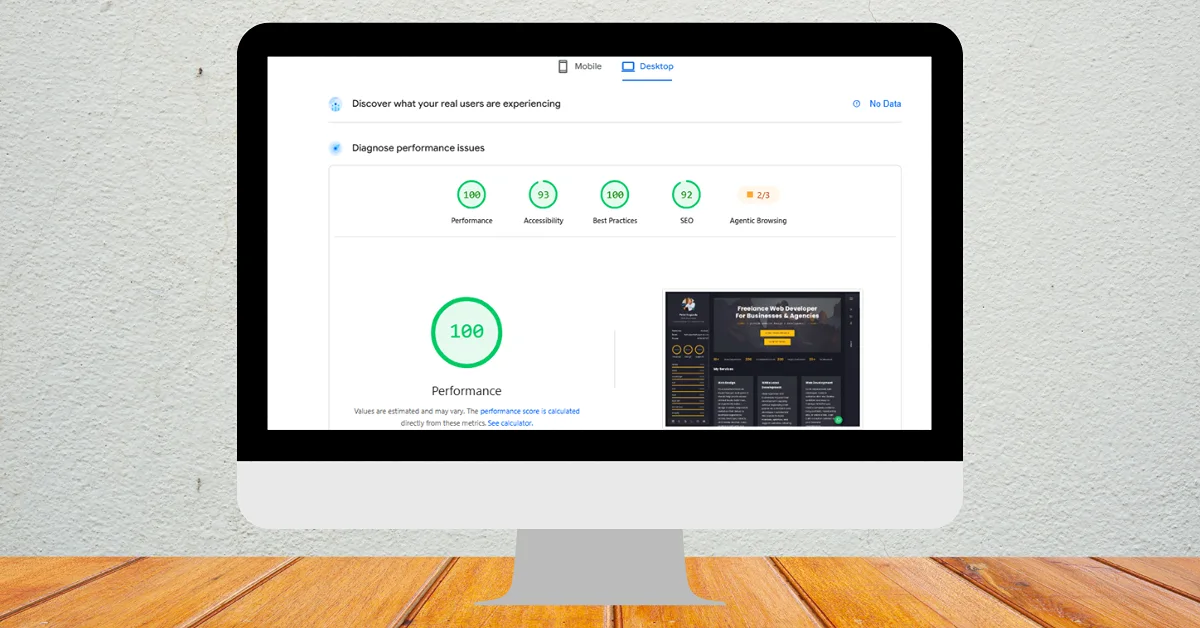
peterkagunda.com just scored a perfect 100 for Performance on Google PageSpeed Insights (desktop), with First Contentful Paint at 0.3 seconds and Largest Contentful Paint at 0.4 seconds. I got there by rebuilding the site on a lightweight custom CMS, serving pre-built cached pages, shipping only the CSS and JavaScript each page needs, and optimising every image.
I'll be honest: when the report finished loading, I refreshed it to make sure I wasn't seeing things. My own website, peterkagunda.com, scored a perfect 100 for Performance on Google PageSpeed Insights. Getting a 100 PageSpeed score is something I chase for clients every week, so seeing it on my own site felt good.
You can check the live PageSpeed Insights report yourself. Below I explain what the score means, exactly what I did to get it, and what you can do to speed up your own website.
The results at a glance
| Metric (desktop) | Result |
|---|---|
| Performance | 100 / 100 |
| Best Practices | 100 / 100 |
| Accessibility | 93 / 100 |
| SEO | 92 / 100 |
| First Contentful Paint (FCP) | 0.3 s |
| Largest Contentful Paint (LCP) | 0.4 s |
In plain terms: the first content appears on screen in about a third of a second, and the main content of the page is fully visible in under half a second. Google considers an LCP under 2.5 seconds "good", so this is well inside that.
What does a 100 PageSpeed score actually mean?
PageSpeed Insights runs Google's Lighthouse tool against your page in a simulated environment and scores it from 0 to 100. The Performance score is a weighted mix of metrics that measure how quickly a page loads and becomes usable, including First Contentful Paint, Largest Contentful Paint, Total Blocking Time and Cumulative Layout Shift. A score of 90–100 is rated green ("good"), and 100 means every measured metric is in the fastest band.
Two things are worth knowing:
Lab data vs real-user data. The score is "lab data" from a controlled test. The separate "real users" section uses Chrome field data and only appears once a site has enough visitors. My report shows "No Data" there for now, which is normal for many small business sites.
Mobile and desktop are tested separately. This 100 is the desktop result. Mobile tests simulate a slower phone and network, so mobile scores are usually lower and need their own attention.
Why website speed matters for your business
Speed is not a vanity number. A faster website means:
More visitors stay. People leave slow pages before they even see your offer.
Better rankings. Google uses page experience signals, including Core Web Vitals, as part of how it ranks pages.
More enquiries and sales. Fast forms, quick product pages and smooth checkouts convert better.
Lower data use for mobile visitors, which matters a lot in markets where many people browse on mobile data.
How I got a 100 PageSpeed score: the optimisations
1. I rebuilt the site on a lightweight custom CMS
My old site carried the weight that many sites carry: a large theme, a page builder and a stack of plugins, each loading its own CSS and JavaScript on every page. I rebuilt peterkagunda.com on a custom Laravel CMS that I designed to load only what each page needs. I can still edit everything from an admin panel, but visitors no longer download code they never use.
2. Pages are served from a full-page cache
Instead of building every page from the database on each visit, the site saves a ready-made HTML copy of each page and serves that instantly. The cache refreshes automatically when I edit content or deploy an update, so visitors always get the latest version without the wait.
3. Only the CSS and JavaScript the site actually uses
The styles are generated with Tailwind CSS, which outputs only the classes used on the site, so the stylesheet stays small. Interactivity comes from Alpine.js, a tiny library, instead of heavy frameworks or jQuery plugins. Everything is bundled and minified with Vite, and each file gets a unique name per release, so browsers can cache it for a long time safely.
4. Every image is optimised
Images are in modern WebP format, which is much smaller than JPEG or PNG at the same quality.
Each image has its width and height set, so the layout does not jump around while loading.
Images further down the page use lazy loading, so they only download when you scroll to them.
The main banner image is marked as high priority so it appears first.
5. Server settings that help the browser
Text files are compressed before they are sent, and static files carry long browser-caching headers, so returning visitors load the site almost entirely from their own device. The site runs fully on HTTPS with modern security headers, which also helped the Best Practices score reach 100.
6. No unnecessary third-party scripts
Chat widgets, trackers, sliders and embedded feeds often slow a site more than anything else. I kept only what the site genuinely needs, and nothing blocks the page from showing while it loads.
What I'm still improving
A perfect performance score is not the finish line. Accessibility (93) and SEO (92) are already in the green, and I'm working through the remaining suggestions in those reports, alongside improving the mobile result. Speed work is ongoing: every new image, page or feature needs to respect the same rules.
How to check your own website's speed
Go to PageSpeed Insights and enter your website address.
Check both the Mobile and Desktop tabs.
Look at LCP, CLS and Total Blocking Time first; these usually show where the biggest gains are.
Scroll to the "Diagnostics" section for specific fixes, such as oversized images or render-blocking files.
Test your most important pages too (services, product and contact pages), not just the home page.
Want your website to be this fast?
Most slow websites can be improved a lot without starting from scratch. Depending on what I find, the fix might be image optimisation, better caching, removing heavy plugins, faster hosting, or a cleaner rebuild. I do this work for businesses and agencies worldwide through my website speed optimization service, and for WordPress sites specifically through WordPress speed optimization. If you'd like to know what's holding your site back first, start with a website and SEO audit.
Frequently asked questions
Is a 100 PageSpeed score necessary to rank on Google?
No. Google ranks pages mainly on relevance and quality of content. Speed and Core Web Vitals are part of the page experience signals, so a fast site helps, but you don't need exactly 100. Aim for scores in the green and "good" Core Web Vitals for real users.
Why is my mobile score lower than desktop?
The mobile test simulates a mid-range phone on a slower network, so heavy images, large JavaScript files and third-party scripts hurt much more. Optimising for mobile first usually improves desktop too.
Why does my PageSpeed score change every time I test?
Lab tests vary slightly because of network conditions, server response time and the test machine. Small changes of a few points are normal. Look at the trend over several tests.
Can a WordPress site get a 100 PageSpeed score?
Yes, it's possible with a lightweight theme, few plugins, good caching, optimised images and fast hosting. Sites built with heavy page builders and many plugins find it much harder.
How long does website speed optimisation take?
Quick wins such as image compression and caching can be done in a few days. Deeper work like removing a page builder or rebuilding templates takes longer, from weeks up to months depending on the size of the site and the requirements.